The Cost of Abstraction for Humans and AI Agents
Over my career I have seen many mid-level developers craving more and more abstraction. I was one of them. But over time I have come to see that more is not always better. A truly senior dev abstracts only when it is needed. And I believe that is less often than most developers think. And since AI learned to code from humans, it overuses abstraction too. And you pay an estimated 30% more on your total AI agent bill for that.
Over-abstraction is not a new idea. It is a well-known topic. I was inspired by Dan Abramov's The WET Codebase. Sandi Metz put it even more succinctly in the post The Wrong Abstraction: "duplication is far cheaper than the wrong abstraction". I want to add my own frontend dev view with examples I have seen over time, and to find out how agents behave and how much this anti-pattern increases our AI costs.
What is abstraction?
It is a boundary between two parts of code: the code it hides, and the code that uses it via an interface. This interface has a name, is reusable, and can have some parameters. The best example is a function.
function sort(array: Array<number>) {
    // implementation code it hides behind the interface
}
// some higher level code uses the interface
sort([2, 1, 3]);
But there are other forms of abstraction which may not be that obvious.
- variable/constant
- JS class
- CSS class
- component
- file
- package
- repository
- programming language
Try to think about how the boundary is represented in each of those. What its interface looks like. What its name is. What it hides and how to reuse it.
Why abstract?
Abstractions are crucial for code maintainability. And they are the reason why we are capable of building large systems. Imagine you always had to write the code for sorting an array or multiplying two numbers. Nightmare.
So we abstract to:
- Hide complexity
- Name a piece of code
- Reuse a piece of code
If none of the above is needed, we should not abstract. And even when some of the above applies, we should still consider not to. We need to balance the cost against the benefit.
Why do we over-abstract?
The question I asked myself is why developers overuse abstractions so often. I see four reasons.
-
It is a very quiet enemy. It adds up slowly. One wrong abstraction costs us and our velocity almost nothing. So it's hard to focus on and spot.
-
When a developer is afraid of touching an existing abstraction layer, they would rather create a new one. It can be due to time pressure. They can't properly read and understand all the logic and adjust the existing layer. Instead, they create a new one on top of it.
-
Every junior developer, including me, naturally did not create many abstractions when starting to code. We focused on the goal. To make it work. It was hard and challenging enough on its own. And we did not have the capacity to think about something like abstractions. Junior devs tend to write long functions and files, duplicate code, and name interfaces poorly. And their senior mentors tell them to split the code. Reuse lines. Name the functions better. Hide the complexity behind interfaces, ... Abstract more. It is taught in courses and university lectures. DRY, SOLID, Single responsibility, one page function, High Cohesion & Low Coupling, Separation of Concerns, ... All those principles are very well known. Because everybody was a junior once. It has almost become SW dev culture. Abstractions are perceived as good coding practice. Something to praise and be praised for. So naturally, mid-level devs use them a lot.
-
And lastly, in such a pro-abstraction culture, it is hard to learn that abstractions might be a problem, learn to spot the overuse, and very hard to speak up in front of your team. In the end, that's the reason why I am writing about it. :)
AI is trained on human-written code. So naturally it learned this pattern. And it repeats it often.
Every abstraction has a cost
It is not cheap. And it stacks quickly.
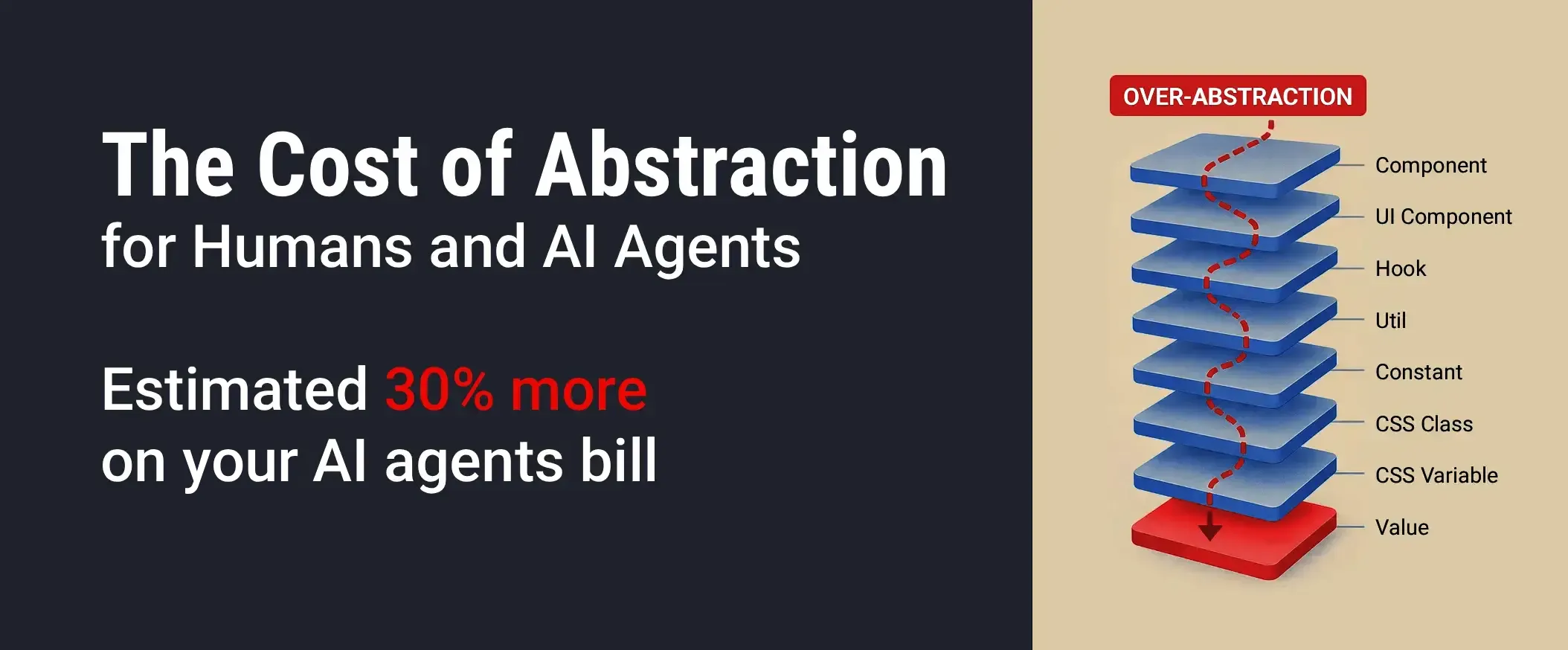
The problem is indirection. Code is less collocated. Program flow jumps back and forth. When reading the code, we need to jump between the implementation and its usage. Our brain needs to keep a deeper stack of what is where. Therefore it's harder to navigate the codebase. It stacks up and creates more interfaces, names and parameters to remember. And therefore it's harder to onboard new people, who have more to learn.
Each team member pays this cost. Every time they read the code. Every AI agent pays this too. On every request and every context retrieval. And every small abstraction adds to the cost for everyone, every day.
It's hard to feel it in text. So say you just want to know what color this delete button is.
<DeleteButton/>
<DangerButton>Delete</DangerButton>
<Button variant="danger" {...props}/>
danger: "btn-danger"
.btn-danger { color: var(--color-danger) }
--color-danger: #e5484d;
Six files to answer one trivial question.
And your AI agent has to pull all six files into its context. More tokens. Digging through one file after another. Slower. And literally more expensive, on every single run. Worse, the fuller the context gets, the harder it is to retrieve the right thing from it. Same indirection, same cost. The only new thing is that you now get an invoice for it. How much is it? I measured it. Keep reading.
How much extra do you pay for AI agents?
An estimated 30% more on an over-abstracted codebase. On the worst task I measured, 5x more. On the best one, 20% less. How did I arrive at those numbers?
I had a hypothesis. But I do not like publishing just my gut feelings. So I started measuring. In the end, I spent tens of hours falling down this rabbit hole. The whole experiment can be found in my GitHub repo. Here I will pin just the most important numbers to keep the article digestible.
First naive attempt
The idea was simple. Create two applications. One with nicely collocated code, and one over-abstracted. I will call them the collocated and the abstracted app. Run an agent with some task on both, measure the cost and time, and compare.
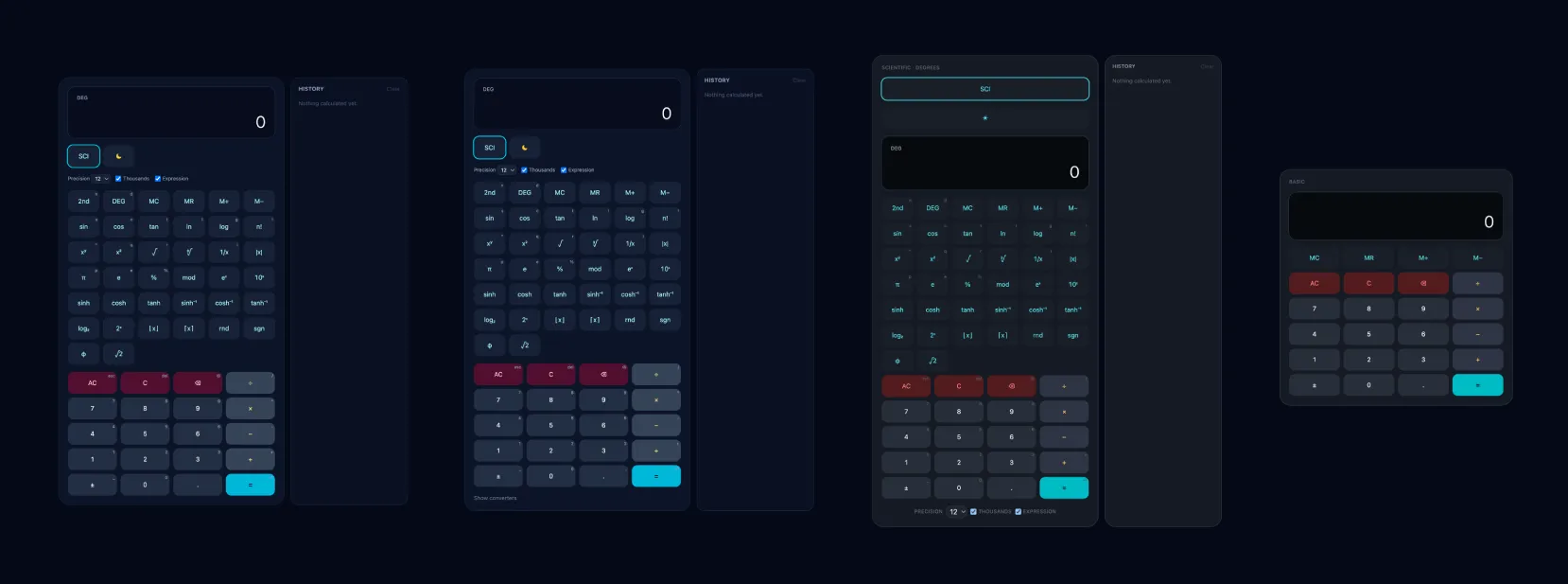
I coded two feature-identical scientific calculators. Vite, React, Tailwind, SPA. Basic and scientific operations, display, history, theming. The over-abstracted one has 12 extra layers of various abstractions. I know the 12 layers is extreme for such a small app but I wanted to make the effect big enough to be measured. However same 12 layers in mid-large codebase is in my experience a standard.
I used model Sonnet 5. The task for the AI agent was to change the color of the = button.
The over-abstracted one cost 5x more. In both money and time.
Imagine paying $5000 instead of $1000 on your monthly AI bill. I was shocked. At the same time, it was hard to believe.
I repeated the measurements 10x to be >95% confident that the difference was not just random variation. Same result.
Then I started digging deeper.
Codebase size is not the reason
The first thing I wondered was whether the cost was caused by the increase in source code size, or by the abstraction layers. I checked the size and it really was bigger. The collocated app was 2,000 lines, the over-abstracted one 3,500 lines. So I created two more calculator variants. I took the over-abstracted one and removed some features, so it landed at roughly 2,000 lines too. And I took the collocated calculator and added some more features to it, so it landed at roughly 3,500 lines.
I ran the task again against all four apps. This time, comparing apps of equal size, I saw just a 3x increase. I also measured the number of AI model round trips. One is usually needed whenever the AI decides to read a file, analyzes it, and then decides again what to do next. There was a measurable 2.2x increase in the number of rounds. So I was confident the reason really was the abstraction layers. But the 3x increase was still hard to believe, and I was not confident enough to quote it in my article. I started digging deeper and analyzing what costs so much.
It depends on the task
I started playing with the task prompts. Changing a color is a task that hits the abstractions especially hard. To be fair, I designed 7 different tasks for the AI. Including adding a new feature, removing a feature, refactoring code, and fixing a bug. I even designed one task to hit the collocated app hard. It changes values inside a single over-abstracted layer, but 12 files in the collocated variant.
The numbers are the over-abstracted app relative to the collocated one. 2x means twice as expensive.
| Task | Why | Cost | Time |
|---|---|---|---|
| Change one value at one leaf | finding the place; all apps edit one file | 5.0x | 4.3x |
| Send a value through the view model | crossing layer boundaries | 2.1x | 2.3x |
| Edit one string | minimal possible task, one line in all apps | 1.8x | 1.6x |
| Delete a feature | unpicking vs deleting | 1.6x | 1.3x |
| Add a new operation key | growing a registry vs adding a leaf | 1.3x | 0.9x |
| Find and repair a defect | finding, rather than specifying | 0.9x | 1.3x |
| Restyle twelve keys at once | the case abstraction is built for | 0.8x | 0.7x |
The cost varies between 0.8x and 5x. There are tasks on which the over-abstracted app is both cheaper and faster.
However, it's worth mentioning that for the last task I had to disable bash tooling for the AI agent.
Otherwise it used bash sed to update the 12 files in the collocated app and the collocated app wins again with 1.3x cheaper.
Where the money goes
After running all of those tasks (394 agent runs), I had enough data to look at the correlation between round trips, file sizes, costs, and the number of files read. It seems the file size increase itself adds little to the final cost. I think it is beacuse of a context cache. The heaviest contributors to the price are the files read and the round trips. Meaning abstractions that stay in the same file are almost free for AI agents. The ones that cross file boundaries are the expensive ones. Keep this in mind for the examples below.
I also found that in some situations it is beneficial to have a well-named abstraction. It behaves like an index for the AI. So it can search the codebase more easily and locate the desired file faster. You can see this effect in the "Find and repair a defect" task which decreases the cost by roughly 10%.
Extrapolating to a real codebase
It was obvious that the final cost depends heavily on what the agents do with your codebase. But I still wanted a number to quote. So I asked Fable 5 to gather all the information from the experiment and try to extrapolate the numbers for a real mid-to-large codebase under regular development. It answered 40%, along with the method it used to get there. I rounded it down to 30% to stay conservative. The extrapolation is a model, not a measurement.
For me, the number still feels unexpected and huge. Hard to believe. I would love to dig one more level deeper. Anyway, after tens of hours of playing with it, I'm confident enough to quote this:
Over-abstraction has a price: an estimated 30% increase in your AI agent costs.
But now I will go to sleep and spend some time with my family. :)
Examples of when not to abstract
Note that all the examples are against abstraction. And that's on purpose. It's not that I think we should never abstract. Please abstract. It's crucial for anything non-trivial. Just learn how often and where to put the boundary. I believe all readers can easily imagine situations where abstraction is good. We were taught them as juniors. Here I present the cases where it is unnecessary.
The experiment showed that what costs AI agents is crossing file boundaries. Examples #1 and #2 stay within one file, so they are almost free for agents. They still cost the human reader, though. Indirection hurts, even on one screen. Examples #3, #4, #5 and #6 cross files. Those are the ones that hit both your colleagues and your AI bill.
1. Constant
const VARIANT = "outline";
if (mobile) {
    <Button variant={VARIANT}>
} else {
    <Button size="lg" variant={VARIANT}>
}
if (mobile) {
    <Button variant="outline">
} else {
    <Button size="lg" variant="outline">
}
Do we need a VARIANT constant here?
Does it need a name? If it were something well-known like PI or HTTP_UNAUTHORIZED_STATUS, I would be ok with it.
But it's just a general prop value here.
It is reused twice here. That is not enough to justify the cost.
The rule of three says the same.
And it does not hide anything complex. Just a simple string.
Moreover, we can expect TypeScript to guard the correct enum value in the variant component prop.
No real benefit here. Inline it.
2. JSX Element Mapping
const social = ["fb", "x", "linkedin"]
return (
    <ul>
        {social.map((id) => (
            <Social key={id} id={id}/>
        ))}
    </ul>
)
return (
    <ul>
        <Social id="fb"/>
        <Social id="x"/>
        <Social id="linkedin"/>
    </ul>
)
This one I see often. Many React developers have a tendency to avoid duplicating JSX elements in a list.
Instead, they create an array of data and map over it in the template.
But the array does not need a name, is used only once, and does not hide any complexity. The Social component does.
JSX is declarative by itself. It's basically a value expression.
Instead of defining an array of strings, we can just define an array of JSX elements.
It's important to say this works only if the array is static.
Note the mapping even costs us a key prop, which the inlined version does not need at all.
See how much more readable it becomes without it.
3. Factory Function
function createUser(name, email, age): User {
    return {
        name,
        email,
        age
   }
}

const user = createUser(name, email, age)
const user: User = { name, email, age }
In this case, I want to focus on complexity and TypeScript.
The factory takes three parameters and passes them to the object.
Compare the complexity of calling the createUser function with creating the object directly. It is the same.
The name of the shape, three parameters, and some parentheses/braces syntax around them.
The only difference is that the reader is forced to learn the non-standard createUser function.
TypeScript helps us with the name and guards the structure while we use it. So simply inline the object creation. Even if it is used in many places.
We can generalize examples 1 and 3 here. Both the constant and the factory function try to abstract a value expression (not imperative code statements). In typed codebases, it's very hard to justify abstracting a value. Even a complex one. Always try to improve your type system instead (e.g. introduce enums, string literals, discriminated unions) so it guards the usage without introducing indirection.
4. CSS Class
function DeleteAccountBtn() {
    return (
        <Button className="delete-account-btn"/>
    )
}
.delete-account-btn {
    padding-left: 8px;
}
function DeleteAccountBtn() {
    return (
        <Button className="padding-left-8px"/>
    )
}
This is basically what Tailwind does. It allows developers to style elements without any indirection. Without any abstraction. Completely collocated. And I think it is the main reason why Tailwind is so popular.
Just add a utility class to the element. Done. If you need abstraction, abstract. But don't be forced into it when it's not needed.
Note the DeleteAccountBtn component is an abstraction too, and a good one.
It hides the markup and it names the thing well. That boundary makes sense.
The CSS class on top of it is the one that adds nothing.
It does not hide complexity, the component is already named, and the class is used only in this component.
5. Context with Prop Drilling
function DeleteAccountModal() {
    const { disabled } = useDeleteAccountContext()
    return (
        <DeleteAccountButton disabled={disabled}/>
    )
}
function DeleteAccountButton({ disabled }) {
    return (
        <Button disabled={disabled}/>
    )
}
function DeleteAccountButton() {
    const { disabled } = useDeleteAccountContext()
    return (
        <Button disabled={disabled}/>
    )
}
This example is not about adding a new layer of abstraction
but about placing logic in the wrong abstraction layer.
The DeleteAccountButton could hide more complexity, which is unnecessarily exposed here.
One of the main reasons why we use React context is to avoid prop drilling. But what I see very often during code reviews is hooking into a context from a parent component instead of the child. This way we have both the context and prop drilling. We get the disadvantages of both patterns.
The rule of thumb here is to hook into the context from the deepest component that is scoped to it. In other words, the closest to where the context value is used.
In this example, we move the useDeleteAccountContext hook from the parent DeleteAccountModal to the child DeleteAccountButton.
But not deeper into the general Button component,
because that one is meant to be reused in other places outside the scope of DeleteAccountModal and its context.
If we left it in the modal, we would force the reader (both human and agent) to jump between two files and track the usage of the extra prop.
6. Translation Layers
function useAccountType() {
    const status = useAccountStatus()
    return STATUS_TO_TYPE[status]
}

const STATUS_TO_TYPE = {
    "waitingForApproval": "WAITING"
    ...
}
function UserProfile() {
    const type = useAccountType()
    if (type === "WAITING") {
        return <div>...</div>;
    }
}
function UserProfile() {
    const status = useAccountStatus()
    if (status === "waitingForApproval") {
        return <div>...</div>;
    }
}
My last example is translation layers with little or no logic. Just renaming incoming values. It hides no complex logic, the layer below can be reused the same way, and the renaming hurts more than it helps. I guess the developer feels that their naming makes more sense. But that is often just personal preference. Most importantly, it doubles the naming conventions. So instead of remembering one set of names, we must now remember two. Increasing our mental load.
From my experience, it is best to follow the naming of the well-known libraries and external systems you use. Like reusing status names from TanStack Query (loading/pending/fetching/idle/...) or following your backend REST endpoint names. Even if they are a bit off for your specific frontend case. It's easier to consume just one sub-optimal layer of names than a great one on top, when you still sometimes need to dig into the sub-optimal one underneath anyway.
Conclusion
Abstractions can have benefits, and our codebases cannot live without them. But ...
Every abstraction has a cost. In both human mental load and the AI agent bill. We often pay the cost without getting any real benefit.
Every indirection created stacks up. Whether introduced by you, your colleagues, or your AI agents. Those indirection costs are paid by you, your colleagues, and your agents, every time the codebase is read, every day.
After an experiment with 394 agent runs on four codebases, I estimate that development on an over-abstracted codebase costs 30% more in AI agent bill and time than development on a collocated one.
After realizing the cost, I started to use these rules: no-over-abstraction.md. Making them openly available here. Hoping it will help you to reduce both mental load and AI bill.
Think before you abstract. Look for overuse during code reviews. Tell your team. Instruct your agents.
Thank you for reading.